Jun 25, 2024

How Should We Manage Gadget Addiction in Children?

How Should We Manage Gadget Addiction in Children? image

In this digital era, gadget addiction in children has become a major concern for parents. Excessive digital use can negatively impact a child’s physical, emotional, and social development. A notable study in Bangladesh identified a significant relationship between high gadget addiction and poor cognitive function among children. This research also indicated certain factors, including demographic and family dynamics.  However, parents should not worry too much as gadget addiction can be controlled. Before discussing ways to control gadget addiction, parents must first understand the causes of gadget addiction in children.


Causes of Gadget Addiction in Children


Attractive Digital Content

Kids Playing Game

The presence of applications, video games, and social media keeps children constantly engaged due to their attractive features. Passive engagement with entertainment through digital devices can have significant disadvantages and contribute to the development of gadget addiction in children. When children’s interactions with technology are primarily focused on passive consumption of content, rather than active learning or creative activities, it increases the risk of them becoming overly dependent on and addicted to their devices.

Furthermore, social media can make children feel valued and acknowledged through likes and comments, which can lead to addiction to validation. The algorithms behind these applications are designed to continually capture users’ attention, making it difficult for children to stop and increasing the likelihood of excessive use of social media and video games.


Lack of Alternative Activities

Children who do not have activities such as hobbies or other physical activities are more prone to gadget addiction. A lack of alternative activities will lead children to turn to digital devices to fill their free time.

Some academic studies indicated that increased screen time is often associated with higher rates of sedentary behavior, which includes prolonged periods of sitting or lying down. The impact of screen time on physical activity levels is significant, with evidence suggesting that screen engagement leads to decreased physical activity and increased risk of being overweight​

For example, children without physical activities will quickly become bored, and playing with gadgets becomes the go-to activity. Thus, a lack of social interaction and outdoor activities contributes to the increase in gadget use among your children.


Parental and Environmental Role

Parents Busy With Gadget

Children tend to imitate what they see. Studies have shown that young children often replicate what they see on screen or what is modeled by adults in their immediate surroundings.  If children see parents or people in their environment frequently using gadgets, they will feel that excessive gadget use is normal and will contribute to gadget addiction.

For example, if parents are often busy with their gadgets in front of their children, the children will assume this behavior is acceptable. Hence, parents have a significant influence in shaping their children’s habits.


Emotional Needs

Gadget addiction

Research indicates that children often use gadgets to cope with stress, boredom, or loneliness in real life. This behavior is associated with various mental health outcomes, and gadgets are sometimes used as a primary tool for emotional regulation. They see gadgets as a primary solution to their problems, not realizing that other activities, such as playing outside or interacting with friends, and any other things like that.

It’s true that Some studies suggest that such use can temporarily relieve stress but might not address underlying issues, leading to potential increases in depressive and anxiety symptoms later on.

Children who struggle to communicate or do not receive enough attention from their parents are likely to seek solace in gadgets. This can become a difficult habit to break without the proper steps from parents.


Read Our Other Articles:

Best 19! Sekolah Swasta dan Internasional di Kota Surabaya Barat – Biaya, Alamat, Lengkap 2024/2025

Why Website Speed is Important? How to Check a Website Speed by Yourself


Ways to Control Gadget Addiction in Children


Set Time Limits for Gadget Use
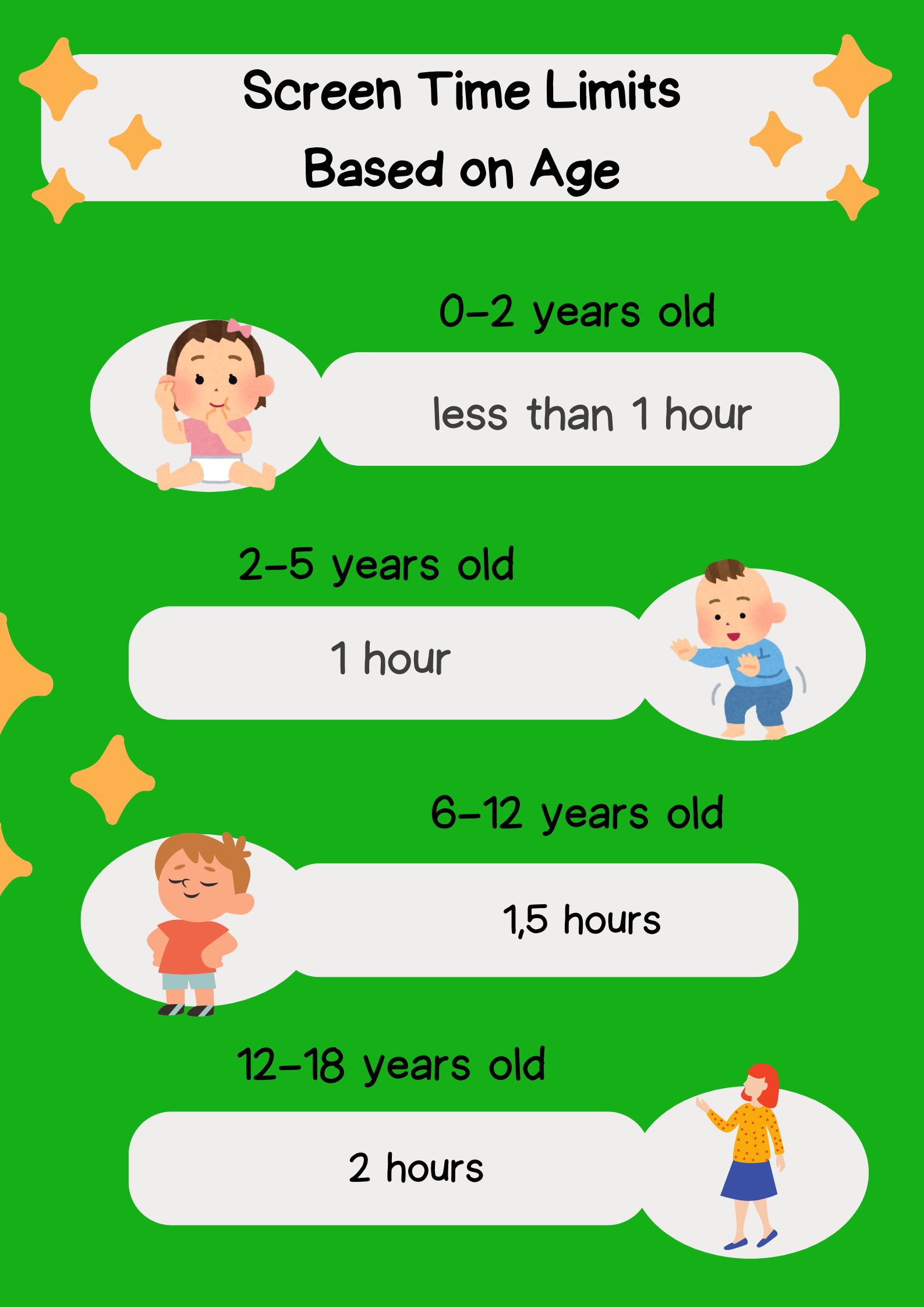
Screen Time Based on Age

Screen Time Limit Based on Age. Designed by Timedoor Academy

According to the Ministry of Health of the Republic of Indonesia, children under the age of 2 are recommended not to be given access to gadgets. If necessary, usage should not exceed 1 hour per day and must be supervised by parents. Children aged 2-5 years are recommended to have 1 hour daily. For children aged 6-12 years, it should not exceed 1.5 hours per day, and for children aged 12-18 years, it is 2 hours per day.

Parents can create a daily schedule that includes time for studying, playing outside, physical activities, and rest to help children understand the importance of balancing their time.


Give a Good Example

Children will imitate their parents’ habits. Therefore, parents must set a good example in using gadgets. Show your children that you have time limits and engage in other activities such as exercising.

Research suggests that parental behavior significantly influences children’s habits and attitudes toward technology. For example, parents can set rules not to use gadgets during dinner or family gatherings. This way, children will know there is a specific time for gadget use.


Encourage Other Positive Activities

Aktivitas untuk anak
Encourage your children to engage in various other activities, such as playing outside, drawing, exercising, or finding hobbies that match their interests and talents. Providing these activity options will help children shift their focus away from gadgets.

Additionally, encouraging children to participate in community or club activities can help them discover new interests and become more socially involved. This is effective in reducing screen time.


Educate About Gadget Use

According to BMC Psychiatry, excessive mobile device use among children is linked with various mental health outcomes like anxiety, stress, and poor educational performance. Teach your children about the consequences of excessive gadget use. Parents can explain the negative impacts and discuss with children how to use gadgets wisely. Developing digital literacy and gadget usage is important to help prevent potential gadget addiction in children. When children have the skills and understanding to use digital devices responsibly, they are less likely to become overly reliant on or addicted to them.”

This education can include information about the health risks associated with excessive gadget use. By understanding these risks, children can be more cautious when using gadgets.


Use Parental Controls
Google Family Link

In this practical era, parents do not need to worry too much about their children’s gadget activities. You can activate Parental Control features on your children’s devices. These controls can monitor the apps your children use, how long they use them, and even block inappropriate content. However, parents must also understand and respect their children’s privacy to maintain their comfort.

These controls can be accessed on various devices, such as Android, iOS, Windows, Google, and even home wifi routers. This way, you can feel more at ease by controlling your children’s activities through these features.


Involve Children in Educational Activities
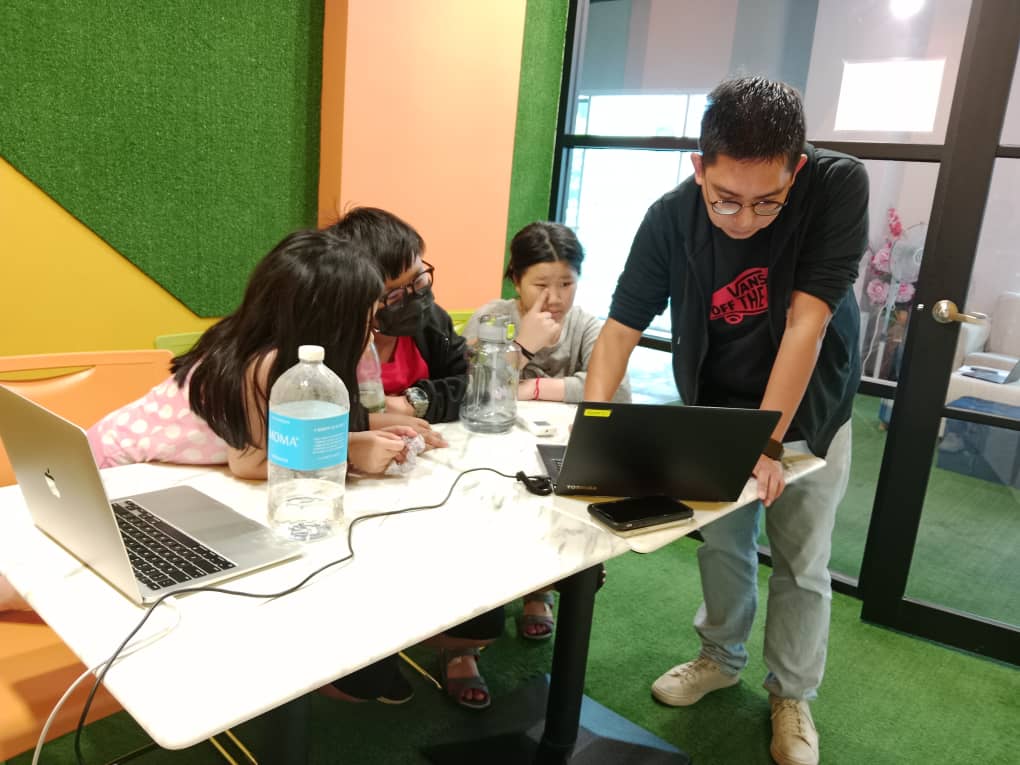

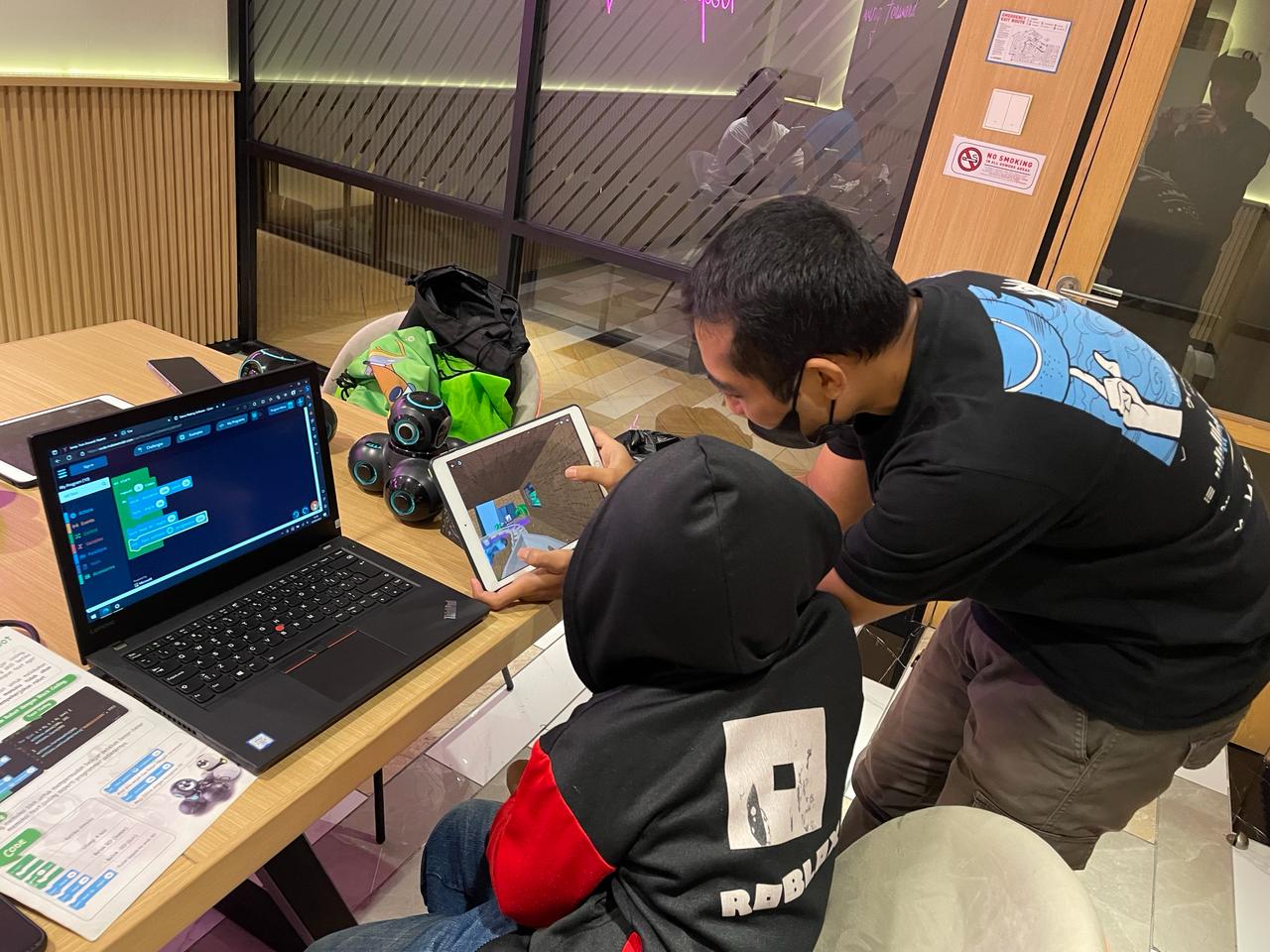
Parents should take the right innovative approach in facing this digital era. If parents find it challenging to change their children’s gadget addiction to a more productive utilization, involve them in educational activities that use gadgets, such as language learning apps, coding, and programming classes, or educational games.


Those are some important points parents should consider regarding children’s gadget use. You can manage gadget addiction by utilizing technology educationally, as offered by Timedoor Academy.

Timedoor Academy offers IT Education classes for your beloved children to stay positively engaged with technology. Here, children will learn to utilize technology, including creating and developing their own games.

We offer trial classes for those who want to try it first. Register your children now and experience the benefits! Try it for free here.
Keep Reading

apps for kids learning english
10 Best Apps for Kids Learning English in 2025 (Fun and Effective Tools)
In today's digital age, many parents are turning to technology to support their child's education. If you're searching for apps for kids learning English, you are in the right place. The right apps can help children build their vocabulary, improve pronunciation, and master grammar while having fun through interactive games, songs, and storytelling. This article features the 10 best apps for kids learning English in 2025. Whether your child is a complete beginner or looking to sharpen their English skills, these apps offer engaging ways to learn at home or on the go.   10 Best Apps for Kids Learning English in 2025 (Fun and Effective Tools)   1. Duolingo Kids Why it’s great: Duolingo Kids simplifies English learning with bite-sized, gamified lessons. The colorful design and rewards system make it exciting for young learners. Key Features: Fun vocabulary practice with visual cues Audio support for correct pronunciation Progress tracking for parents Ideal for: Children aged 4 to 10 who enjoy playful, interactive learning.   2. Lingokids – Playlearning App Why it’s great: Lingokids offers a complete English learning experience for kids. It includes games, songs, and videos that cover grammar, vocabulary, and conversation skills. Key Features: Adaptive learning based on skill level Downloadable content for offline use Weekly progress reports for parents Ideal for: Preschool and elementary-aged children who learn best through play.   3. Endless Alphabet Why it’s great: This app uses adorable animated monsters to introduce English words in a fun and engaging way. It's great for building vocabulary and early literacy skills. Key Features: Animated word puzzles Clear voice narration No ads or distractions Ideal for: Toddlers and young children who are just starting with apps for kids learning English.   4. ABCmouse Why it’s great: ABCmouse offers a full curriculum, including reading, phonics, and grammar lessons in English. With thousands of activities, kids stay engaged while learning. Key Features: Structured learning paths Hundreds of English storybooks Built-in reward system for motivation Ideal for: Kids aged 2 to 8 who need a well-rounded learning app.   5. Fun English by Studycat Why it’s great: This app uses games and songs to teach kids English vocabulary, phrases, and sentence structures. It's fun and suitable for both beginners and bilingual learners. Key Features: Voice recognition to practice speaking Games covering numbers, colors, and animals Easy navigation for kids Ideal for: Children who want to learn English in a playful environment.   6. Reading Eggs Why it’s great: Focused on reading and comprehension, Reading Eggs offers phonics-based lessons that improve vocabulary and fluency. Key Features: Interactive reading games English storybooks and lessons Adaptive difficulty levels Ideal for: Early readers who want to improve their English comprehension.   7. Khan Academy Kids Why it’s great: This free app includes English reading lessons along with math, logic, and social-emotional learning. The friendly characters guide kids through interactive stories and games. Key Features: High-quality educational content Creative learning tools No ads and completely free Ideal for: Parents looking for high-value, free apps for kids learning English.   8. Monkey Stories Why it’s great: Monkey Stories features a vast library of animated stories in English. Kids can follow along with subtitles, improving listening and reading skills. Key Features: 1,000+ English books and stories Interactive reading mode Daily learning goals Ideal for: Children who enjoy learning through storytelling.   9. Speakia Why it’s great: Speakia focuses on improving speaking and conversational English skills. It uses AI to simulate dialogues, helping kids speak more confidently. Key Features: Speaking practice with instant feedback Real-life conversation simulations Progress tracking Ideal for: Kids who need extra help with speaking and listening in English.   10. Hello English Kids Why it’s great: Hello English Kids offers lessons in vocabulary, sentence structure, and everyday conversations. The app is simple to use and designed for young learners. Key Features: Games and videos for better engagement English tests and flashcards Child-friendly interface Ideal for: Beginners looking for simple and effective apps for kids learning English.   Tips of Choosing Apps for Kids Learning English Choosing the best apps for kids learning English depends on your child's: Age and learning level: Make sure the content is age-appropriate. Learning style: Some children prefer stories, while others enjoy games or visuals. Screen time: Pick apps that are ad-free and encourage short, productive sessions. Look for apps that allow offline access and offer progress reports so parents can stay involved.   Final Thoughts There are plenty of amazing apps for kids learning English, but the key is to find one that suits your child’s unique interests and learning pace. From storytelling apps to full learning platforms, each of the ten apps mentioned above offers a different approach to mastering English in a fun, engaging way. If your child enjoys using technology to learn, why not take the next step with Timedoor Academy’s online coding classes? While they explore apps to improve their English, learning to code can help them develop logical thinking, creativity, and problem-solving skills. These are essential abilities in today's digital world. Try a free coding class at Timedoor Academy today and empower your child for the future.
Timedoor Academy Win Coding Competition in Southeast Asia!
Timedoor Academy Shines at the Biggest Kids Coding Competition in Southeast Asia! We are thrilled to share the outstanding achievements of our students at the largest kids coding competition in Southeast Asia, Tech Kids Grand Prix ASEAN 2024, organized by a prominent Japanese company. This prestigious event brought together young coding enthusiasts from various countries, providing them with an incredible platform to showcase their creativity, skill, and determination. An Unforgettable Event This competition provided a platform for kids to showcase their unique coding projects, ranging from mobile apps to games, and even multimedia presentations. More than just a competition, it was an opportunity for students to explore their passions, push their boundaries, and connect with like-minded peers. Timedoor Academy is thrilled to announce that three of our students stood out in the competition, earning impressive awards for their innovative work. Timedoor Academy also had several other students who earned Top 30 recognition, which further demonstrates the exceptional talent and dedication within our community. Nadzkara Fakhri Madenda (Fay) Fay menciptakan sebuah game interaktif kekayaan budaya Indonesia. Proyek ini memperkenalkan berbagai aspek budaya, seperti makanan tradisional, alat musik, pakaian, dan permainan rakyat daerah Indonesia. Fay meraih Presentation Award berkat kemampuannya dalam mempresentasikan proyek ini secara menarik dan detail di depan para juri. Mohammad Fardeen Fardeen dari Bangladesh, menciptakan sebuah aplikasi tabungan yang ditujukan untuk anak-anak. Fardeen terinspirasi dan merancang platform yang membantu anak-anak memahami pentingnya menabung dan literasi keuangan. Berkat visinya yang inovatif dan relevan, Fardeen berhasil meraih Product Award. Top 30 Achievers In addition to our winners, we also want to acknowledge the Top 30 students who represented Timedoor Academy with excellence. These students achieved impressive rankings that reflect their hard work and commitment: I Nyoman Aditya Basudeva Mahaputra (Gatsu Branch) Gede Agasthya Putra Darmawan (Gatsu Branch) Theodorus Giovanni D (Gayungan Branch) Jabir Sharwar (Online Bangladesh) Mahrus Rahman Ayan (Online Bangladesh) We are incredibly proud of all these students for their exceptional achievements and their contributions to the competition. A Truly Memorable Experience For our winners, this competition was more than just about winning—it was about growth, learning, and gaining invaluable experience. Both Fay and Fardeen expressed how meaningful the competition was to them, highlighting how much they learned throughout the process and how grateful they were for the guidance and support from Timedoor Academy and their dedicated teachers. Fay and Fardeen described the experience as “awesome” and said it was a journey they would always cherish. Support from Timedoor Academy To cheer on our students, Yutaka Tokunaga (CEO), Ayu Krisnasari (Curriculum Manager), and Bernadet Andini (Curriculum and Teacher Leader) flew to Singapore to provide their support during the event. Their presence was a testament to Timedoor Academy’s commitment to empowering students and supporting their growth at every stage of their learning journey. We are incredibly proud of all the students who participated in this prestigious event. Their success is a reflection of their creativity, perseverance, and the dedication of the teachers and mentors who supported them. This competition has shown that Timedoor Academy students are truly capable of achieving greatness. Looking Ahead As we celebrate these incredible achievements, we are also looking forward to future opportunities for our students to shine. Timedoor Academy will continue to support and nurture young talent, helping them develop the skills they need to succeed in the digital world. We are excited to see what our students will accomplish next! Stay tuned for more inspiring stories from Timedoor Academy as we continue to empower the next generation of innovators! We provide opportunities for children to explore their potential in the programming world through our free trial sessions. For more information, please visit the link here.
Aplikasi Belajar Anak SD
Top 10 Technology Tools for Elementary Students in 2025
As we step into 2025, technology tools for elementary students are more important than ever. These tools enhance creativity, improve learning outcomes, and foster engagement both inside and outside the classroom. With the help of these technology tools for elementary students, children can develop essential skills that will serve them throughout their academic careers and beyond. Here’s a list of 10 essential technology tools for elementary students to boost their educational experience in 2025. Top 10 Technology Tools for Elementary Students in 2025 1. Kahoot! Focus: Interactive learning and quizzes Kahoot! remains one of the most popular technology tools for elementary students because it turns learning into a fun and competitive experience. Teachers and students can create customized quizzes on subjects like math, science, and language arts, fostering active participation. How to Use It: By incorporating Kahoot! in lessons, educators can make learning feel like a game. Students can play individually or in teams, which makes learning not only engaging but also interactive. With real-time feedback, teachers can adjust their lessons based on students' performance, ensuring that every child stays on track. 2. Seesaw Focus: Digital portfolio and communication Seesaw is another fantastic example of technology tools for elementary students that focuses on student documentation and communication. It allows students to create digital portfolios where they can showcase their work through photos, videos, and drawings. This tool strengthens the bond between teachers and parents, as they can track the progress of the students in real-time. How to Use It: With Seesaw, students can upload images of their assignments or record their thoughts on projects. Teachers can provide feedback and conduct virtual lessons or activities, keeping students and parents connected in an efficient, digital space. 3. Google Classroom Focus: Classroom management and assignment tracking Google Classroom is essential for managing assignments, tracking progress, and organizing classroom materials. As one of the top technology tools for elementary students, it helps both teachers and students streamline their work. Teachers can assign tasks, grade assignments, and provide real-time feedback, while students can easily access learning materials and submit work in one centralized platform. How to Use It: Teachers can post assignments and resources to Google Classroom, making it easy for students to stay organized. Additionally, it integrates with Google Drive, enabling students to collaborate on documents and presentations. This makes it easier to stay on top of deadlines and receive instant feedback. 4. Scratch Focus: Coding and creativity Scratch is one of the most popular technology tools for elementary students when it comes to learning programming. Through visual coding, students can create interactive stories, games, and animations, sparking creativity while teaching them important skills in computational thinking. How to Use It: Scratch is beginner-friendly and offers a drag-and-drop interface for students to build their own projects. Teachers can incorporate Scratch into STEM lessons, teaching logic, sequencing, and problem-solving through interactive coding challenges. This tool is a great starting point for young learners to get familiar with coding and digital creation. 5. Epic! Focus: Digital library for young readers For young readers, Epic! is an invaluable tool in the world of technology tools for elementary students. Epic! offers access to thousands of books, audiobooks, and educational videos. Its interactive features like read-aloud and quizzes make reading more engaging for children. How to Use It: Teachers can assign reading materials directly from Epic! to keep students engaged with books that suit their level. Students can explore a vast library of e-books or listen to audiobooks that cater to their individual reading preferences. Epic! fosters a love for reading by offering a fun and interactive approach to literature. 6. ClassDojo Focus: Classroom behavior and communication ClassDojo is one of the best technology tools for elementary students when it comes to fostering positive behavior and classroom culture. It allows teachers to reward students for good behavior, accomplishments, and teamwork. How to Use It: Teachers can assign points to students based on specific behaviors, such as being on task, helping others, or staying focused. These points can be exchanged for rewards like extra break time or special privileges. ClassDojo is an excellent tool for teaching students about responsibility and positive reinforcement. 7. TinkerCAD Focus: 3D design and engineeringFor students interested in design and engineering, TinkerCAD is one of the leading technology tools for elementary students. This user-friendly 3D design platform allows children to create their own digital models. How to Use It: Students can start by designing simple objects like keychains or toys and gradually work their way up to more complex 3D projects. Teachers can use TinkerCAD to introduce students to engineering and design concepts, making it easier for them to visualize their ideas and understand the basics of 3D modeling and printing. 8. Google Earth Focus: Geography and exploration Google Earth opens up the world to elementary students by allowing them to explore every corner of the globe. Whether for geography lessons or environmental studies, this tool is an essential part of technology tools for elementary students. How to Use It: Teachers can use Google Earth to give virtual tours of countries, cities, landmarks, and natural wonders. Students can explore geographical features and learn about different cultures and ecosystems. This immersive tool makes learning about the world fun and interactive. 9. Duolingo Focus: Language learning As one of the leading technology tools for elementary students, Duolingo helps young learners acquire new languages in a fun, gamified format. This app is perfect for introducing kids to a new language, including popular languages like Spanish, French, and German. How to Use It: Duolingo presents lessons in bite-sized segments that are both fun and educational. Students can practice daily and track their progress. This tool offers rewards and challenges, motivating students to keep learning new words and phrases while building language proficiency. 10. BrainPOP Focus: Educational videos and quizzes BrainPOP is a popular educational platform that offers animated videos and interactive quizzes. It covers a wide range of subjects, including science, math, and social studies, making it one of the best technology tools for elementary students to enhance their learning. How to Use It: Teachers can use BrainPOP to introduce new concepts in a fun and visual way. After watching the videos, students can complete quizzes and discuss the material in class. This helps reinforce key ideas and assess student understanding in an engaging, interactive manner. Why Technology Tools Matter for Elementary Students In 2025, technology tools for elementary students are not just an enhancement to traditional learning; they are essential to developing digital literacy and critical thinking skills. These tools help provide personalized learning experiences that adapt to the needs of each student, whether they need extra support or more challenging material. By incorporating technology tools for elementary students into the classroom, teachers can create an environment that promotes engagement, creativity, and collaboration, preparing students for future success in an increasingly digital world. Start Your Digital Learning Journey Today! Want to make learning even more engaging for your child? Explore Timedoor Academy and try free trial class today and discover how our digital learning platform can support your child’s educational growth with interactive lessons and expert-curated content.
float button